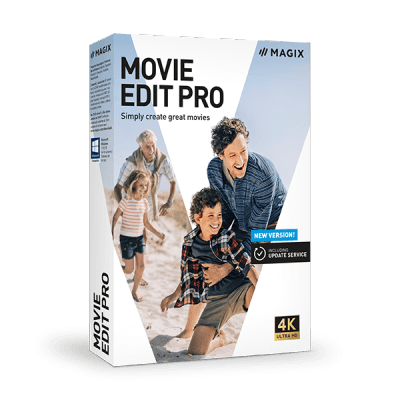
Movie Edit Pro
Movie Edit Pro is designed to offer exceptional video editing features and tools to beginners and advanced users. The storyboard mode supports automatic optimizations for... Movie Edit Pro is designed to offer exceptional video editing features and tools to beginners and advanced users. The storyboard mode supports automatic optimizations for novice users and the timeline mode is for more advanced users, enabling frame by frame video editing on up to 99 tracks. Its key features include multiple product instances, ready to install, free re-download anytime, money-back guarantee, amazing technical support, and much more.
Top Movie Edit Pro Alternatives

Artlist
Video creators can access an expansive collection of over 700,000 digital assets, including high-quality music, sound effects, AI voiceovers, and...
DxO FilmPack
DxO FilmPack revives the essence of classic photography by offering a curated selection of over 45 color and 38 black...
FXhome
The video editing software offers a robust platform for creating stunning visual content, featuring intuitive tools for effects, transitions, and...

HD Video Converter Factory Pro
HD Video Converter Factory Pro is a powerful video editing software designed for seamless conversion, editing, and downloading of videos...

Ashampoo Movie Studio Pro
This advanced video editing software allows users to create stunning high-resolution videos with precision cuts, transitions, and effects. Supporting up...

ApowerEdit
ApowerEdit is an intuitive video editing tool that empowers users to craft stunning, professional-quality videos effortlessly. With features for trimming,...

Ashampoo ActionCam
Ashampoo ActionCam transforms chaotic footage into captivating visuals with cutting-edge video stabilization and distortion correction. It enhances colors and sharpness...

Apowersoft Online Video Editor
Apowersoft Online Video Editor empowers users to craft impressive videos effortlessly through an intuitive browser-based platform. Featuring essential editing tools...
Telestream Vantage
Telestream Vantage offers powerful video transcoding and workflow automation solutions tailored for diverse needs. It excels in live webcasting, screencasting,...

macXvideo
This intuitive video editing software enables users of all skill levels to create stunning cinematic videos effortlessly. With features like...

DVDVideoSoft Free Video Editor
This free video editing software allows users to easily trim and cut unwanted sections from their videos without re-encoding, preserving...

VCam
XSplit VCam revolutionizes webcam usage by enabling seamless background removal and blurring without the hassle of green screens or complex...

Amara
The Amara Editor streamlines captioning and subtitling with its intuitive interface and advanced features, such as adjustable playback speed and...

PhotoKey Pro
PhotoKey Pro revolutionizes green screening with its intelligent chroma key technology, effortlessly replacing backgrounds in studio shots. Equipped with 250...

MAGIX Video Pro X
MAGIX Video Pro X is a powerful video editing software designed for advanced users, featuring an intuitive interface that simplifies...
Movie Edit Pro Review and Overview
Create videos in a better way with Movie Edit Pro. Movie Edit pro lets your create entertaining video faster than you ever did. It is the award-winning video editing tool that provides a variety of effects and supports your workflows. The ultra-fusion engine saves your time and lets you create videos in less time and enjoy results with your friends.
Why should you opt for Movie Edit Pro?
You can simply start loading everything from any device that may be a video camera, DSLR, or a Smartphone. Trim your videos in no time by using the cutting nodes of Movie Edit Pro. Add a final touch to your videos if the footage or recording is dark or light.
Use the video material for unique moments and rescue your videos. The main thing to shine your videos or films is making use of effects, transitions, and applying titles on them. Burn the Blu-ray Discs or DVD and enjoy your video on TV in UHD quality. Now your film is ready to present in front of your family and friends.
Edit videos
Various operations make it unique and simplify the process of your video editing, with the simplified functions for video editing procedures that enable you to spend more time for unleashing the creativity.
Storyboard and Timeline
Everyone has different methods to work. Movie Edit Pro offers you the choice to display your videos on visual layouts just similar to screenplay by using a storyboard feature. For editing video with too much detail, Movie lets you switch to its timeline feature.
Wizards
By using Wizards imports, Edit, and optimize and create your videos in the fastest way. If you want extra support, you can use wizards. It is entirely customizable and automated to offer better and quick results every time.
Company Information
- Company: Magix Software GmbH
- Country: Germany
Top Movie Edit Pro Features
- User-friendly interface
- 30-day free trial
- Supports multiple video formats
- Professional plug-ins included
- Advanced color correction options
- Slow-motion and time-lapse effects
- Integrated YouTube export feature
- Animated video effects
- Travel route animations
- Comprehensive tutorials and hints
- Low-performance computer compatibility
- Immediate access upon purchase
- Automatic subscription renewal
- Customizable editing templates
- Multi-track video editing
- Audio enhancement tools
- Video stabilization feature
- Social media sharing options
- Frequent software updates
- Customer support via email
